Practice Lock | Combination3.2.0
Publisher Description

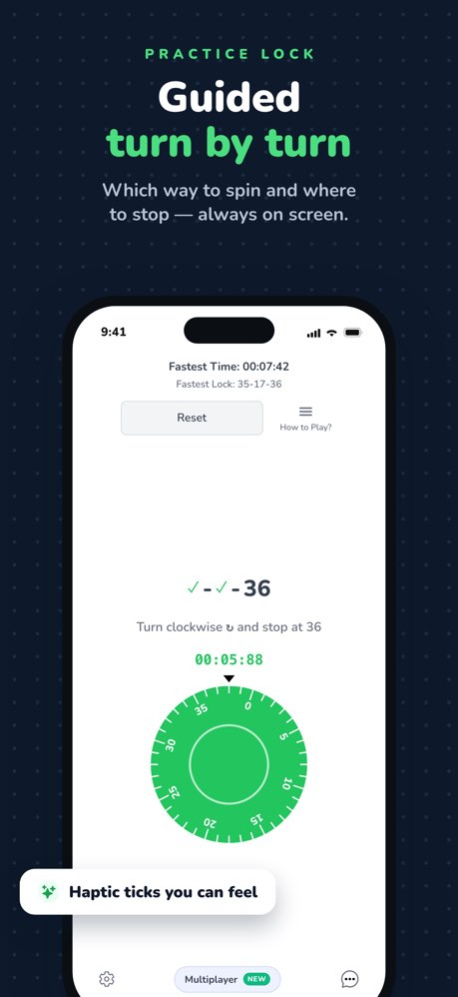


Unlocking rotary combinations can become second nature with ample practice! Whether you're preparing for school lockers or a safe, Lock Practice brings you a hands-on simulation to master the twists and turns right on your screen. Customize configurations, race against a timer, and become adept at cracking combos!
PRACTICE MAKES PERFECT
Experience realistic unlocking with the in-app rotary combination lock. The digital dial behaves just like a real one. Rotate to enter your combination, then tap or swipe up to unlock. Made a mistake? Just keep spinning to reset and try again.
TIMER CHALLENGE
Test your unlocking speed with our Timer Challenge! Set your desired time and try to crack the combo before time runs out. It adds a fun and competitive edge to your practice!
GUIDED ASSISTANCE
Encounter a common hiccup? Our app will provide helpful hints to correct common mistakes like missing a crucial rotation before entering the next number.
STEP-BY-STEP WALKTHROUGH
Enable Walkthrough Mode for a guided experience. The step-by-step instructions will assist you through the process, ensuring you grasp the mechanics of unlocking a rotary combination.
CUSTOMIZABLE COMBOS
Exercise your skills with various configurations. Select from two number ranges: 0-39 or 0-49, generate random combinations, or input a custom combo to practice a specific sequence.
VIBRANT DIAL COLORS
Make your practice engaging with six lively dial colors: red, yellow, green, blue, purple, or black. Choose one that suits your style!
PRACTICE ANYTIME, ANYWHERE
Whether you're gearing up for the new school year or just honing your lock-picking skills, Lock Practice is your go-to app to learn and master rotary combination locks wherever you are!
With Lock Practice, turning the dial towards unlocking success has never been more engaging and enjoyable!
Version History Practice with your real locker combination, learn with a guided lesson, and choose when to hide the direction arrows. This update also adds clearer coaching, smoother controls, and fixes for custom combinations. 3.2.0 Aug 25 New in 3.1: the app now teaches you! Tap Teach Me for a step-by-step lesson on opening your first combination lock, with an arrow right on the dial showing which way to turn. Made a wrong turn? The lock now explains what happened instead of silently resetting. Plus My Locker: save your real locker's combination, practice it, and look it up if you ever forget it (saved only on your device). Locks with numbers up to 49 are now fully supported, and the whole app got a cleaner look. 3.1.0 Aug 12 Minor improvements and polish. 3.0.2 Jul 22 • All-new multiplayer: race friends in real time
• Smoother, more accurate dial
• Clearer instructions and bug fixes 3.0.1 Jul 17 Complete redesign of the page
- Fix bug where bottom sheet doesn't open
- Redesign UI to have a cleaner appearance 3.0.0 07/22/2025 • Made the app completely free!
• Improved gesture handling
• Minor bug fixes / improvements 2.1.0 08/20/2024 - Cleaned up the entire page to make it easier to learn
- Add in app purchases
- Locks can now change colors
- Fix bugs where it would crash 2 12/26/2023 1.0 10/04/2023
About Practice Lock | Combination
The company that develops Practice Lock | Combination is Omolewa LLC. The latest version released by its developer is 3.2.0.
To install Practice Lock | Combination on your iOS device, just click the green Continue To App button above to start the installation process. The app is listed on our website since 2026-10-08 and was downloaded 1 times. We have already checked if the download link is safe, however for your own protection we recommend that you scan the downloaded app with your antivirus. Your antivirus may detect the Practice Lock | Combination as malware if the download link is broken.
How to install Practice Lock | Combination on your iOS device:
- Click on the Continue To App button on our website. This will redirect you to the App Store.
- Once the Practice Lock | Combination is shown in the iTunes listing of your iOS device, you can start its download and installation. Tap on the GET button to the right of the app to start downloading it.
- If you are not logged-in the iOS appstore app, you'll be prompted for your your Apple ID and/or password.
- After Practice Lock | Combination is downloaded, you'll see an INSTALL button to the right. Tap on it to start the actual installation of the iOS app.
- Once installation is finished you can tap on the OPEN button to start it. Its icon will also be added to your device home screen.
Program Details
System requirements
Download information
Pricing
Version History
version 3.2.0
posted on 2026-10-08
Version History Practice with your real locker combination, learn with a guided lesson, and choose when to hide the direction arrows. This update also adds clearer coaching, smoother controls, and fixes for custom combinations. 3.2.0 Aug 25 New in 3.1: the app now teaches you! Tap Teach Me for a step-by-step lesson on opening your first combination lock, with an arrow right on the dial showing which way to turn. Made a wrong turn? The lock now explains what happened instead of silently resetting. Plus My Locker: save your real locker's combination, practice it, and look it up if you ever forget it (saved only on your device). Locks with numbers up to 49 are now fully supported, and the whole app got a cleaner look. 3.1.0 Aug 12 Minor improvements and polish. 3.0.2 Jul 22 • All-new multiplayer: race friends in real time
• Smoother, more accurate dial
• Clearer instructions and bug fixes 3.0.1 Jul 17 Complete redesign of the page
- Fix bug where bottom sheet doesn't open
- Redesign UI to have a cleaner appearance 3.0.0 07/22/2025 • Made the app completely free!
• Improved gesture handling
• Minor bug fixes / improvements 2.1.0 08/20/2024 - Cleaned up the entire page to make it easier to learn
- Add in app purchases
- Locks can now change colors
- Fix bugs where it would crash 2 12/26/2023 1.0 10/04/2023
version 3.1.0
posted on 2026-08-21
Version History New in 3.1: the app now teaches you! Tap Teach Me for a step-by-step lesson on opening your first combination lock, with an arrow right on the dial showing which way to turn. Made a wrong turn? The lock now explains what happened instead of silently resetting. Plus My Locker: save your real locker's combination, practice it, and look it up if you ever forget it (saved only on your device). Locks with numbers up to 49 are now fully supported, and the whole app got a cleaner look. 3.1.0 Aug 12 Minor improvements and polish. 3.0.2 Jul 22 • All-new multiplayer: race friends in real time
• Smoother, more accurate dial
• Clearer instructions and bug fixes 3.0.1 Jul 17 Complete redesign of the page
- Fix bug where bottom sheet doesn't open
- Redesign UI to have a cleaner appearance 3.0.0 07/22/2025 • Made the app completely free!
• Improved gesture handling
• Minor bug fixes / improvements 2.1.0 08/20/2024 - Cleaned up the entire page to make it easier to learn
- Add in app purchases
- Locks can now change colors
- Fix bugs where it would crash 2 12/26/2023 1.0 10/04/2023
version 3.0.2
posted on 2026-07-24
Version History Minor improvements and polish. 3.0.2 21h ago • All-new multiplayer: race friends in real time
• Smoother, more accurate dial
• Clearer instructions and bug fixes 3.0.1 5d ago Complete redesign of the page
- Fix bug where bottom sheet doesn't open
- Redesign UI to have a cleaner appearance 3.0.0 07/22/2025 • Made the app completely free!
• Improved gesture handling
• Minor bug fixes / improvements 2.1.0 08/20/2024 - Cleaned up the entire page to make it easier to learn
- Add in app purchases
- Locks can now change colors
- Fix bugs where it would crash 2 12/26/2023 1.0 10/04/2023
version 3.0.0
posted on 2026-07-06
Version History Complete redesign of the page
- Fix bug where bottom sheet doesn't open
- Redesign UI to have a cleaner appearance 3.0.0 07/22/2025 • Made the app completely free!
• Improved gesture handling
• Minor bug fixes / improvements 2.1.0 08/20/2024 - Cleaned up the entire page to make it easier to learn
- Add in app purchases
- Locks can now change colors
- Fix bugs where it would crash 2 12/26/2023 1.0 10/04/2023
version 3.0.0
posted on 2025-07-22
Jul 22, 2025
Version 3.0.0
Complete redesign of the page
- Fix bug where bottom sheet doesn't open
- Redesign UI to have a cleaner appearance
version 3.0.0
posted on 2025-07-22
Complete redesign of the page
- Fix bug where bottom sheet doesn't open
- Redesign UI to have a cleaner appearance
version 2.1.0
posted on 2024-08-20
Aug 20, 2024
Version 2.1.0
• Made the app completely free!
• Improved gesture handling
• Minor bug fixes / improvements
version 2
posted on 2023-12-26
Dec 26, 2023
Version 2
- Cleaned up the entire page to make it easier to learn
- Add in app purchases
- Locks can now change colors
- Fix bugs where it would crash
